Kite turns your iPad into a real second display for your Mac. USB-C at your desk, Wi-Fi around the house, Tailscale across town. Free to try, pay once to keep. No sign-up.
25 msaverage, Mac capture to iPad display, on home Wi-Fi
50 dBpicture quality (PSNR). Small text stays crisp
60 fpsthe most macOS draws for a virtual display
0servers between your Mac and your iPad
Measured with Kite's built-in probe on a Mac mini and a 10th-generation iPad. The delay is shown live on the iPad, so you can check it on your own network.
Why Kite
Sidecar stops at the front door. Kite keeps going.
Another Apple Account. Another part of town. Still connected.
Same Apple Account only
Sidecar won't pair a family iPad, a work iPad or a second-hand one. Kite pairs any iPad with any Mac. You click Allow once.
Within 10 meters
Sidecar needs the iPad close by. Kite reaches your Mac from a café, a hotel or the office over your own Tailscale network.
A subscription for the pen
Other apps put Apple Pencil pressure on a higher plan. Kite includes it in a single purchase, along with the iPad camera as a Mac webcam.
Three ways to connect
One string. Kite picks the shortest one.
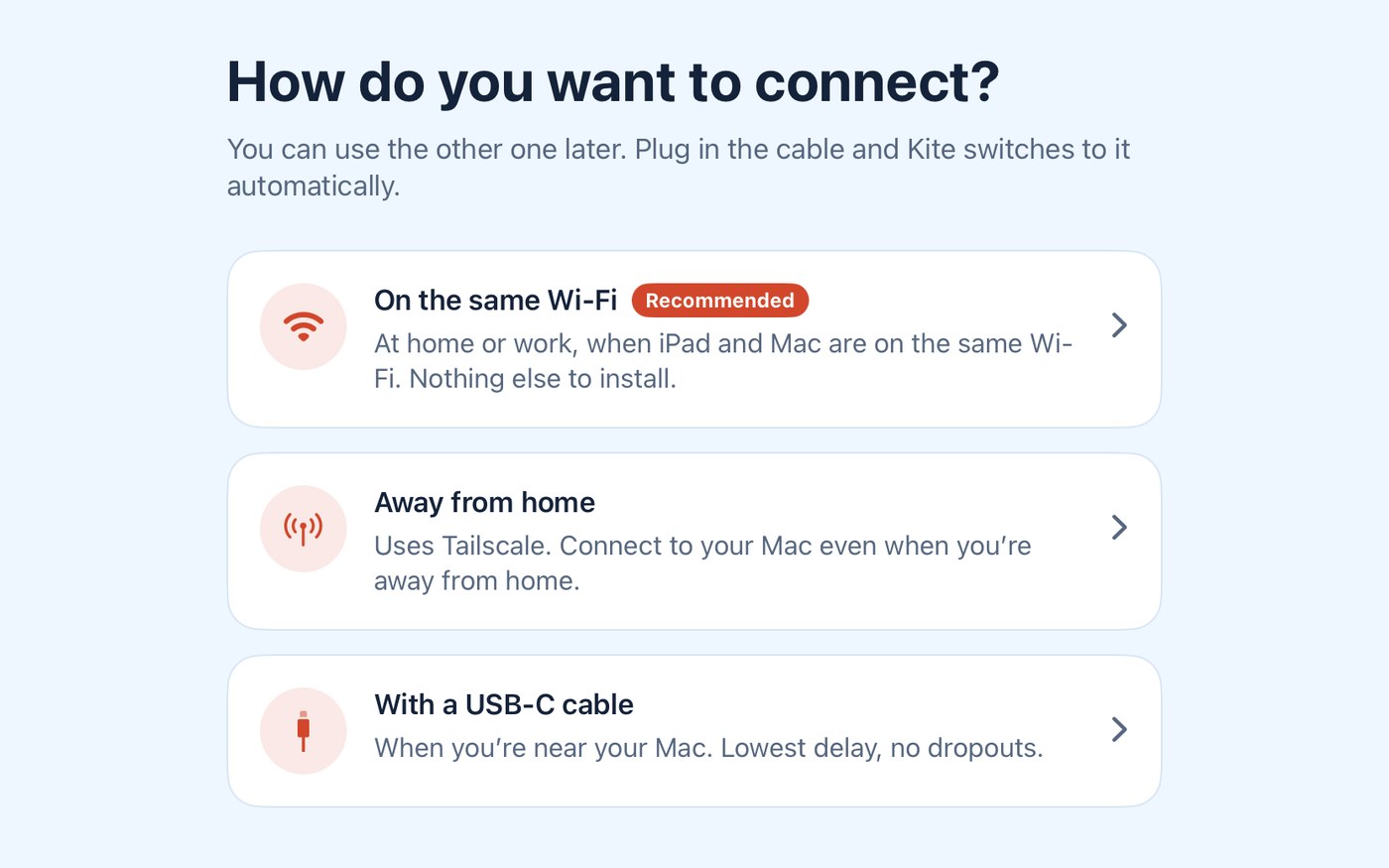
Plug in a cable and it switches to the cable. On the same Wi-Fi, video goes straight across your network. No Wi-Fi network? Nearby, the two connect directly. Anywhere else, it rides Tailscale.
USB-C
Mac iPad
At your desk
Connect with a cable and Kite connects on its own. The lowest delay, and your iPad charges while you work.
Home Wi-Fi
Mac iPad
Around the house
On the same network, video goes directly between your devices, encrypted with a fresh key for every session.
Tailscale
Mac ··· iPad
Away from home
At a café, at the office, at a friend's place. Your Mac at home becomes the screen in your bag.
Features
A display you can touch, draw on, and talk through.
Draw
Apple Pencil with pressure
Pressure, tilt and hover go to your Mac like a drawing tablet. Double-tap for the eraser. Pick a soft, standard or firm pressure curve to match how hard you press. Squeeze Apple Pencil Pro to show the sidebar.
Display
A real second display
macOS sees your iPad as a monitor. Put it on any side from the menu bar, at the iPad's own Retina resolution. Turn the iPad and the display turns with it.
Camera
Your iPad or iPhone camera on your Mac
Pick “Kite Camera” in Zoom, Meet or FaceTime and your iPad's or iPhone's camera turns on. It runs only while an app is using it.
Kite Deck
A button board for your Mac
Big buttons on your iPad for key combinations, text snippets, apps, Shortcuts, volume and playback — one tap each. When you don't need a screen, connect as just the button board. On iPhone, just tap your Mac.
Control
Sidebar with ⌘ ⌥ ⌃ ⇧
Shift-click to select a range, Command-click to pick files, undo with one tap. Choose which buttons it shows, like Mission Control, Spotlight or Choose a window.
25 ms⌘⌥⌃⇧↶↷
Tap ⌘
Applies to the next click or key, then lets go.
Double-tap ⌘
Stays on until you tap it again.
↶ ↷
Undo and redo in the app in front.
25 ms
Live delay. Blue means healthy.
Touch
Pinch to zoom
Zoom in on the iPad to hit small buttons or draw fine details. Your Mac's layout doesn't change.
Keyboard
Type from the iPad
On-screen keyboard with Japanese and Chinese input, or a hardware keyboard. ⌘C, ⌘V and the arrow keys go to the Mac.
Connect
Finds your Mac
Macs on the same Wi-Fi appear as cards. Tap one and click Allow on the Mac, once. Macs you've used before are one tap away when you're out.
Sleep
Handles a sleeping Mac
If the Mac's screen goes to sleep, the iPad waits instead of disconnecting. Tap “Wake Mac” and the picture comes back.
Mac
Lives in the menu bar
No Dock icon. Opens at login if you want, so a Mac mini without a monitor is ready when you are.
15 languages
Speaks your language
Both apps come in 15 languages, from Japanese and Chinese to German, Spanish and Korean.
The app
Pick your Mac. That's the setup.
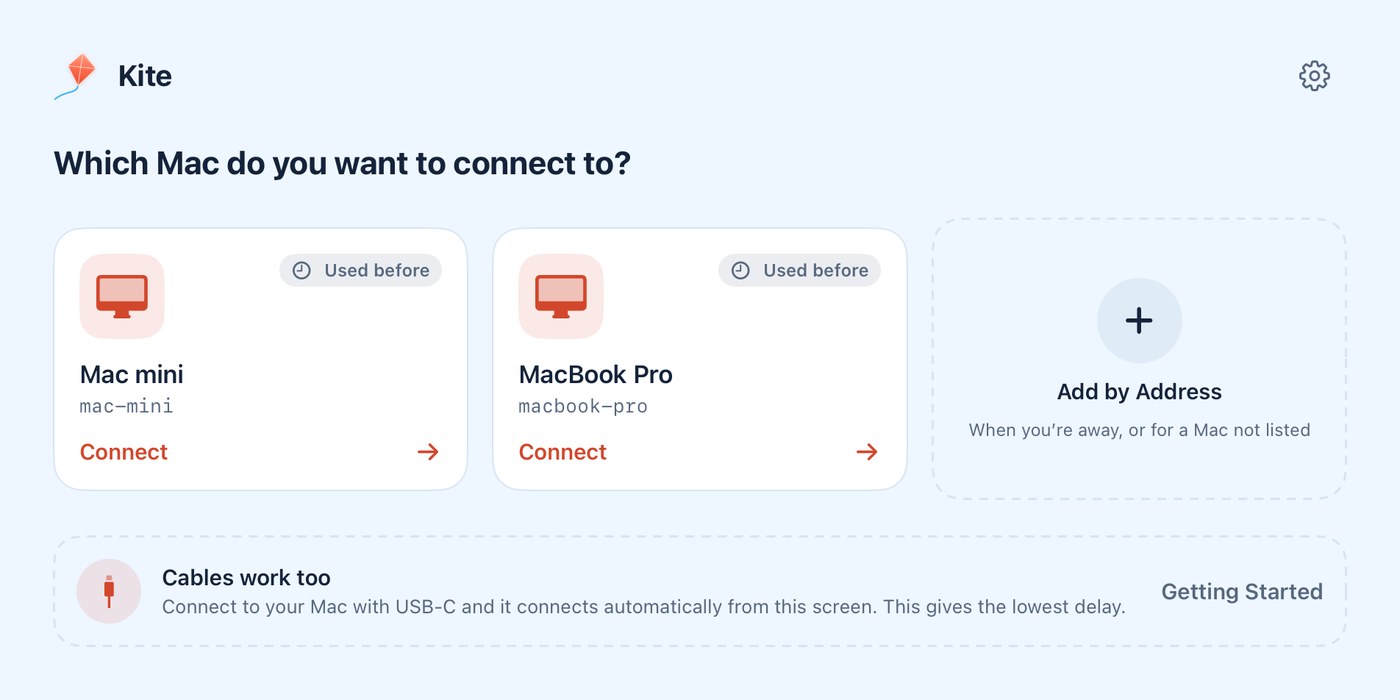
Your Macs, as cards. Macs on the same Wi-Fi and Macs you've used before. Tap one to connect.
Wi-Fi or a cable. Choose once. Plug in a cable any time and Kite switches to it.
Screenshots of Kite for iPad. The Mac names and addresses are examples.
Where it flies
One iPad. Your whole Mac, wherever you are.
Café
Leave the Mac at home
Your desktop Mac keeps running at home. Open Kite on the iPad in your bag and it's on the table in front of you.
Mac mini
No monitor needed
Kite opens at login and waits in the menu bar. Your iPad is the Mac mini's screen when you need one.
Video calls
A better webcam
Stand the iPad next to your Mac and pick Kite Camera. Handy for a Mac mini, which has no camera of its own.
Drawing
A pen display you already own
Draw in Mac apps with Apple Pencil pressure and tilt. Pinch to zoom in for detail without changing the Mac's layout.
Setup
Two minutes, once.
Install Kite for Mac
Move it to Applications and open it. A setup window walks you through Screen Recording and Accessibility.
Open Kite on your iPad
Plug in a USB-C cable, or tap your Mac in the list. For a new Mac on the same Wi-Fi, just compare a 6-digit code. Away from home, turn on Tailscale on both.
Click Allow, once
The first time a new iPad connects, your Mac asks. After that it connects without asking, over any route.
The only one that works away from home without a subscription.
Feature
Kite
Sidecar
Duet Display
Luna Display
OpenDisplay
Lightspan
Price
Free to try, $9.99 once Mac app free
Free, built into macOS
$39.99–$79.99 a year
$89.99 adapter
Free, open source
€9.99 once
Use it away from home
Yes, with Tailscale
No. Within 10 m
Duet Air plan
No. Same network
No. Same network
No. Same network
iPad on a different Apple Account
Yes
No. Same account required
Yes
Yes
Yes
Yes
Sign-up needed
None Away from home uses a free Tailscale account
Same Apple Account, two-factor
Duet account
?
None
None
Ways to connect
USB-C · Wi-Fi · Tailscale
Wi-Fi · USB
Wi-Fi · USB
Wi-Fi · USB · Ethernet · Thunderbolt
Wi-Fi · USB
Wi-Fi · USB-C
Apple Pencil pressure
Yes, included
Yes
Pro plan
With Astropad Studio (subscription)
No
No
iPad camera as Mac webcam
Yes
No
No
No
No
No
Encrypted on your Wi-Fi
Yes, new key every session
?
Yes, per Duet
?
Not yet, per its privacy page
Yes (TLS)
From each product's own website, support pages and App Store listing, checked October 10, 2026. “?” means the product doesn't say. Prices change; check before you buy.
60 fps, not 120. macOS draws virtual displays at up to 60 fps. The pointer itself moves at 120 Hz on ProMotion iPads.
Away from home needs Tailscale. The same Wi-Fi or a USB-C cable needs nothing. To reach your Mac from elsewhere, install Tailscale (free for personal use) on both.
One iPad per Mac. When a second iPad connects, the first one is disconnected.
The Mac app isn't on the Mac App Store. Virtual displays use a macOS feature App Store apps can't use. It's signed and notarized by Apple instead.
A purple icon in the menu bar. macOS shows it for any app that captures the screen. Kite captures only the display it adds for your iPad.
Privacy
Your screen never touches a server.
Kite has no account, no license server and no analytics. It collects nothing, and it keeps working if our website goes down.
Only your devices can connectYour Mac accepts connections only from iPads you allowed (on the same Wi-Fi, only over a link encrypted with the key from that pairing), devices on your own Tailscale network, or a cable you plugged in. Not from strangers on the same café Wi-Fi.
A new iPad needs your OKThe first time, you click Allow on the Mac. You can remove an iPad from the menu bar at any time.
Encrypted on every pathTailscale encrypts end to end with WireGuard. On your home network Kite adds its own AES-GCM encryption with a new key every session.
Only the iPad's display is capturedScreen Recording permission is used for the virtual display Kite adds, not your main screen.
Your Mac, on a string.
Free to try. One price to keep.
Kite for iPad
$9.99once, inside the app
Try it firstFree download. Every feature works for 15 minutes per connection, up to 30 minutes a day.
No subscriptionBuy once in the app and keep it. Updates included.
Apple Pencil pressure and the iPad cameraNo higher tier to unlock.
At home and awayUSB-C, Wi-Fi and Tailscale. Tailscale is free for personal use.
Kite for Mac is freeSigned and notarized by Apple.
Sold by ApplePaid through the App Store. Refunds go through Apple. Bought it before? It stays unlocked.
On a computer? Scan with your iPad's camera to open the App Store.
macOS 15+ · iPadOS 18+
FAQ
Questions
Do I need Tailscale?
Not over a USB-C cable or the same Wi-Fi. For a new Mac on the same Wi-Fi, you compare a 6-digit code shown on the iPad and the Mac. Only to use it away from home, install Tailscale (free for personal use) on both.
Does it work without a Wi-Fi network?
Yes (Kite for Mac and Kite for iPad 1.6.0 or later). When the iPad and Mac are close, they connect directly, even with no Wi-Fi network or on hotel Wi-Fi that blocks devices from talking to each other. Keep Wi-Fi turned on on both. The Mac's card shows “No Wi-Fi”.
Can I control my Mac with buttons, like a Stream Deck?
Yes (Kite for Mac and Kite for iPad 1.7.0 or later). Kite Deck puts big buttons on your iPad that press key combinations, type text snippets, open apps, run Shortcuts, change volume and playback, or open web pages on your Mac. When you don't need a screen, touch and hold your Mac on the iPad and choose “Connect as Kite Deck”. See Use your iPad as a button board for your Mac.
Does it work on iPhone?
Yes (Kite for Mac and Kite for iPhone 1.9.0 or later). It's the same app as on iPad, so if you bought it on iPad, it works on an iPhone with the same Apple Account. On iPhone, tapping your Mac connects as Kite Deck (the button board); touch and hold and choose “Connect as a Display” to see your Mac's screen and control it with your finger. The iPhone camera works as Kite Camera too. A Mac connects to one iPad or iPhone at a time.
Does my iPad need the same Apple Account as my Mac?
No. Any iPad can pair with any Mac. The first time, you click Allow on the Mac.
Does my screen go through your servers?
No. We don't run any servers. The picture goes straight from your Mac to your iPad, over a cable, your home network or Tailscale.
What if Kite stops being sold someday?
Kite keeps working. There's no account and no license check, so nothing on our side can switch it off.
Which Apple Pencil works?
Pencils with pressure (1st and 2nd generation, Pro) send pressure and tilt. Apple Pencil (USB-C) has no pressure sensor, so it draws at full pressure. Hover works on iPads that support it.
Is it a subscription?
No. The iPad app is free to try; to keep using it, you buy it once inside the app. Updates are included.